Yes, you can sell a carrier-locked phone to Techtree if it is paid off, belongs to you, and has no account lock or blacklist restriction. A carrier lock limits the networks the phone can use; it does not prevent a trade-in. Techtree does not accept phones with unpaid financing, iCloud Activation Lock, Google Factory Reset Protection, or a blacklisted IMEI. Clear those restrictions before requesting a sale. Other buyers set their own acceptance policies.
Start by checking which lock you have. Account removal can be quick when you have your credentials, but account recovery, carrier eligibility and security delays can take longer. This guide explains each lock, compares our prices, and shows how to prepare your phone for sale.
At a glance (Techtree, September 23, 2026):
- Techtree buys carrier-locked phones (AT&T, Verizon, T-Mobile and other carriers) as they are. You do not need to unlock the phone first, as long as it is paid off and not blacklisted.
- A carrier-locked iPhone 12 to 14 in Good condition sells to Techtree for about 90 to 99 percent of the unlocked price.
- Techtree cannot buy a phone with iCloud Activation Lock, Google FRP or work MDM still on, a balance owed, or a blacklisted IMEI until that is cleared.
- Every Techtree quote is locked for 21 days and includes a free prepaid shipping label.
Which locked phones can you sell?
Find your lock type below. A paid-off carrier lock can be sold to Techtree; the other restrictions need to be cleared first.
 Carrier lockCan sell
Only one network works. Paid off? Choose that carrier in your quote.
 Balance owedPay off first
Clear the remaining financing, then sell it to us locked. No unlock needed.
 Activation LockRemove first
Sign out of your Apple Account or erase and remove through Find My.
 Google FRPRemove first
Remove every Google Account in Settings before you reset.
 Blacklisted IMEIClear first
Ask the carrier that reported the phone to clear the restriction.
 Work or school MDMRelease first
Ask IT to release management. Sell only a device you own.
A forgotten screen passcode is not a seventh category: erase the phone with Apple's or Google's reset, then clear the account lock as above, and it becomes a normal sale. It is covered below.
How to check if your phone is locked
Many people choose their carrier's name in a trade-in quote because that is the network they use, when the phone itself is already unlocked. On a newer phone that mistake costs real money (see the table in the next section), so check first. It takes thirty seconds.
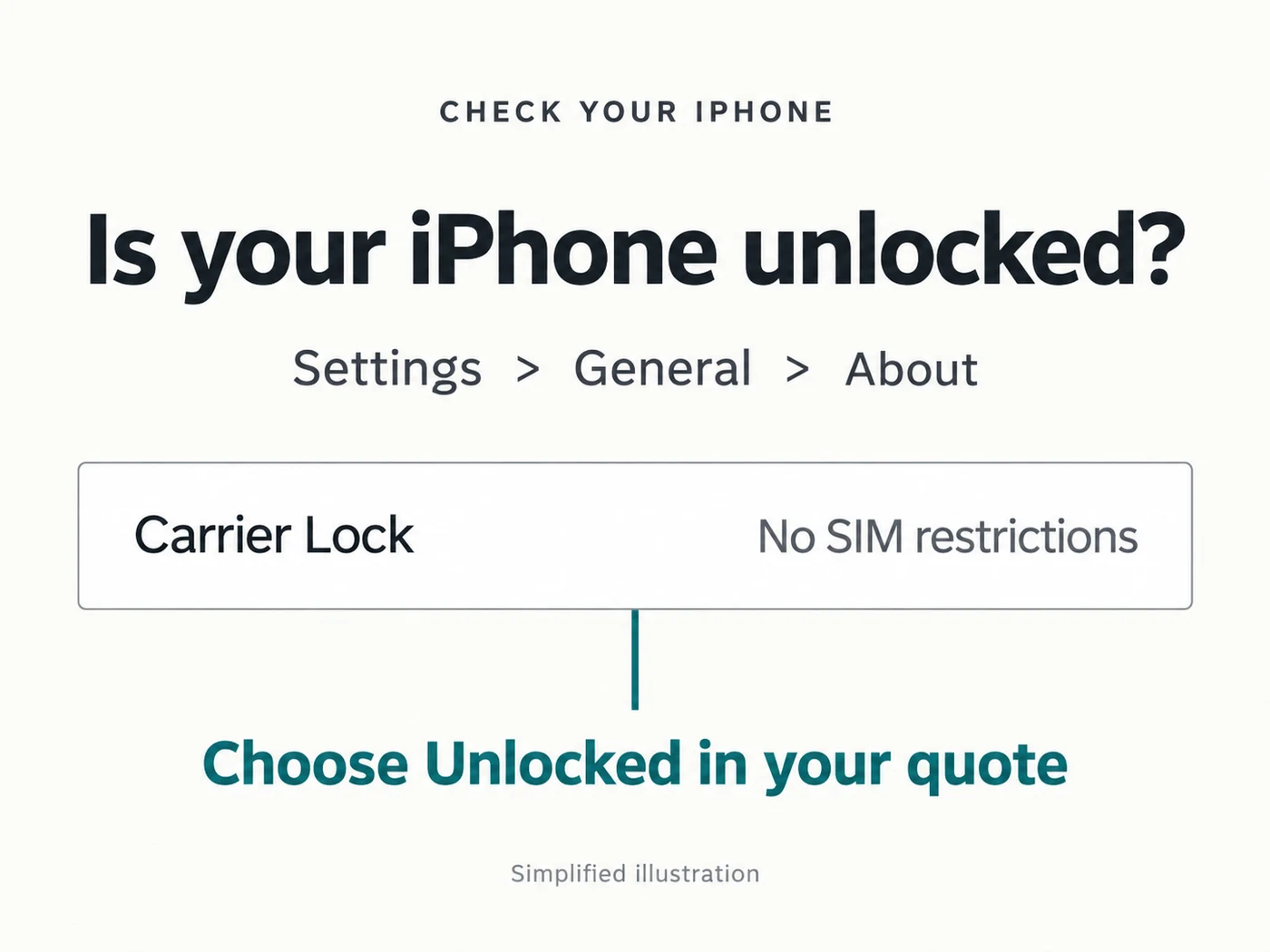
Carrier lock on an iPhone. Open Settings, General, About and look at Carrier Lock. If it says "No SIM restrictions", your iPhone is unlocked, and you should choose Unlocked in your quote. Anything else means it is locked to a carrier.
Carrier lock on Android. There is no single standard screen. The reliable test is a SIM card from a different carrier: if the phone connects and can make a call, it is unlocked. You can also check the device's unlock status in your carrier's app or account.
Activation Lock or FRP. On an iPhone, open Settings, tap your name, then Find My. If Find My iPhone is on, Activation Lock is on. On Android, open Settings, Passwords and accounts (the name varies by maker) and see whether a Google Account is listed.
Blacklist. Dial *#06# to show your IMEI, then enter it in the free Stolen Phone Checker run by CTIA, the US wireless industry association.
What a carrier lock actually costs you
A carrier lock narrows the phone's resale options. The price difference varies by model, carrier, storage and condition. Here are our prices, checked against each linked model's full configuration table, for a phone in Good condition at its base storage:
Good condition, base storage. Swipe the table to compare carriers; model names stay visible.
| Phone | Released | Unlocked | AT&T | Verizon | T-Mobile | Other carrier |
|---|---|---|---|---|---|---|
 iPhone 1264GB iPhone 1264GB |
2020 | $76 | $74 | $75 | $70 | $57 |
 iPhone 13128GB iPhone 13128GB |
2021 | $143 | $132 | $135 | $129 | $96 |
 iPhone 14128GB iPhone 14128GB |
2022 | $158 | $143 | $143 | $143 | $112 |
 iPhone 15128GB iPhone 15128GB |
2023 | $249 | $181 | $195 | $177 | $156 |
 iPhone 16128GB iPhone 16128GB |
2024 | $372 | $296 | $296 | $285 | $222 |
 iPhone 17256GB iPhone 17256GB |
2025 | $499 | $373 | $361 | $362 | $317 |
 Galaxy S24128GB Galaxy S24128GB |
2024 | $168 | $155 | $149 | $152 | $116 |
 Galaxy S25128GB Galaxy S25128GB |
2025 | $275 | $205 | $165 | $175 | $163 |
 Pixel 9128GB Pixel 9128GB |
2024 | $226 | $203 | $143 | $181 | $157 |
Techtree prices checked September 23, 2026, in USD. Each comparison holds model, storage and Good condition constant and changes only the carrier. Percentages divide the carrier-locked offer by the unlocked offer and round to the nearest whole percent. Prices change; each linked model page has the configuration table. The trade-in price index and downloadable CSV provide model-level summaries, not per-carrier quotes.
Three things stand out:
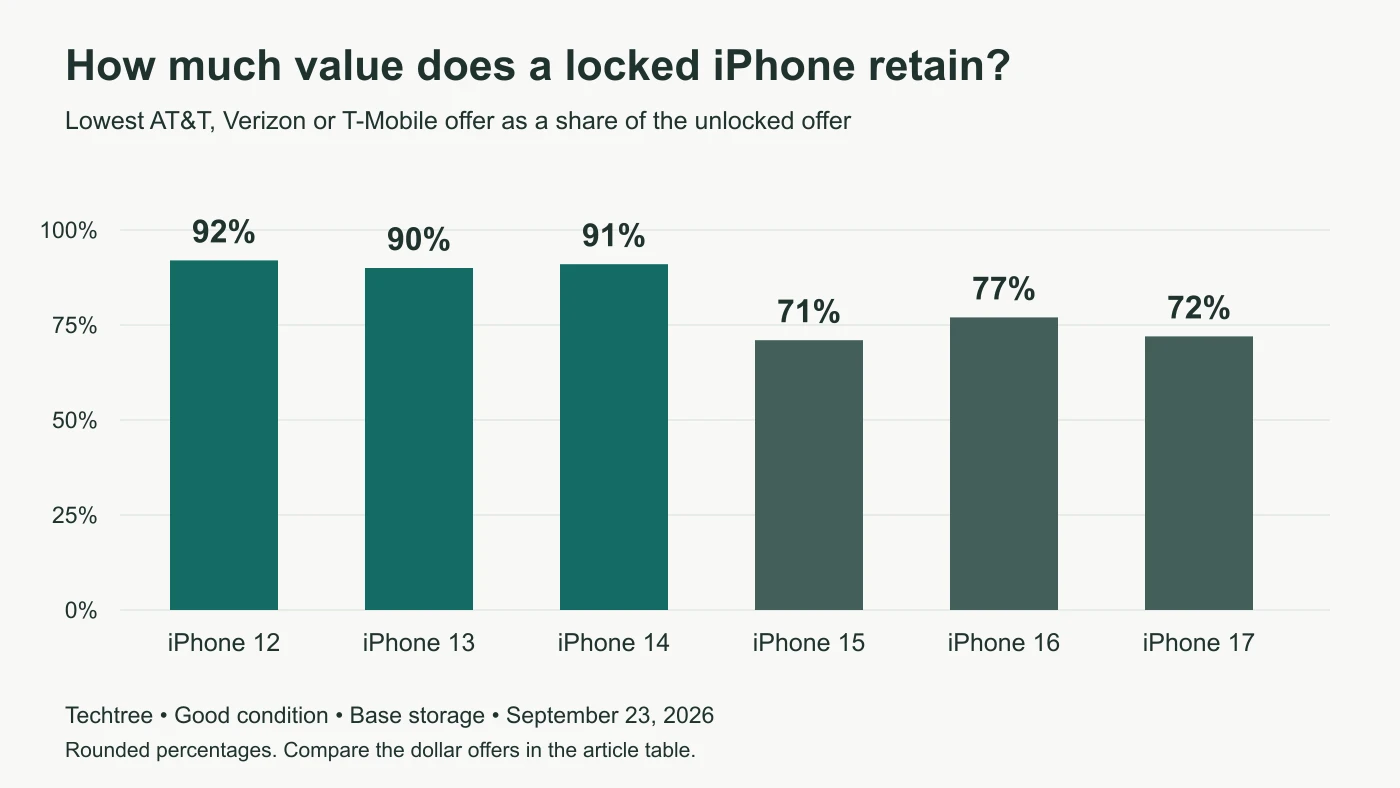
- The older iPhones shown have smaller gaps. An AT&T, Verizon or T-Mobile lock takes $1 to $15 off the iPhone 12, 13 and 14 configurations above, retaining about 90 to 99 percent of the unlocked offer. The Galaxy S24 retains about 89 to 92 percent.
- The newer iPhones shown have larger gaps. On the iPhone 15, 16 and 17 in the table, the difference is $54 to $138. On the Galaxy S25 it reaches $110. You still do not need to unlock the phone to sell it: choose its carrier in your quote and the price already accounts for the lock.
- Other Carrier often pays less. In these nine examples, Other Carrier offers are about 59 to 75 percent of the unlocked offer. It is not always the lowest option: the Pixel 9's Verizon offer is lower. Check the exact configuration for your phone.
One avoidable mistake from the lock check above: choosing Verizon for an iPhone 16 that actually says "No SIM restrictions" leaves $76 on the table.
Is your phone already unlocked? (2026 rules)
Your network provider and your phone's lock status are different things. A phone used on Verizon, AT&T or T-Mobile may already be unlocked. Eligible devices can unlock automatically, but age or paying off the balance alone does not prove eligibility. Check the status on the phone and the carrier's requirements below.
| Carrier | Postpaid phone unlocks when | Prepaid phone unlocks after |
|---|---|---|
| Verizon | Automatically, once bought at full price or the financing is paid in full (a 35-day delay applies when it is paid off with a gift card) | 365 days of paid, active service |
| AT&T | Eligible Apple, Samsung and Google phones "should unlock by itself" once the phone is 60+ days old, the installment balance is zero and the account is current | 12 months of paid AT&T Prepaid service |
| T-Mobile | Within two business days if remote unlocking is supported: at least 40 days active on the requesting line, paid in full and account in good standing | At least 365 days since activation, or more than $100 in refills per active line and more than 14 days since purchase; two unlocks per line per 12 months maximum |
Checked against each carrier's policy on September 23, 2026. Lost, stolen, fraud and account restrictions also apply. T-Mobile provides instructions when remote unlocking is unsupported. See the linked carrier policies below for eligibility and exceptions.
If your phone is paid off and still shows a carrier lock, you do not need to request an unlock to sell it. Techtree buys carrier-locked phones as they are: choose the carrier it is locked to in your quote, and the price for that carrier is on every model page.
Financed phones: pay off first
A remaining balance can prevent unlocking and create restrictions for a future owner. Selling the hardware does not cancel the financing agreement. Under Techtree's seller requirements, devices must have no unpaid financing, installment or carrier balance attached to them.
Check the payoff amount in your carrier account and clear the balance before selling to us. Once it is paid off, you can sell it to Techtree while it is still carrier-locked: choose the carrier in your quote. There is no need to wait for an unlock. If you are upgrading, compare your options in our guide to selling your phone versus a carrier trade-in.
Remove iCloud or Google locks first
Activation Lock (Apple) and Factory Reset Protection (Google) are anti-theft features. Erasing a protected phone does not necessarily release its account lock. The next owner may be unable to activate it without the previous owner's credentials. Back up and transfer anything you need before erasing; a factory reset removes data from the phone.
iPhone: turn off Activation Lock
- After backing up, open Settings, tap your name, and tap Sign Out. Follow the prompts and enter your Apple Account password when asked to turn off Find My. On newer iOS versions, sign-out also offers an erase option.
- Then go to Settings, General, Transfer or Reset iPhone and tap Erase All Content and Settings.
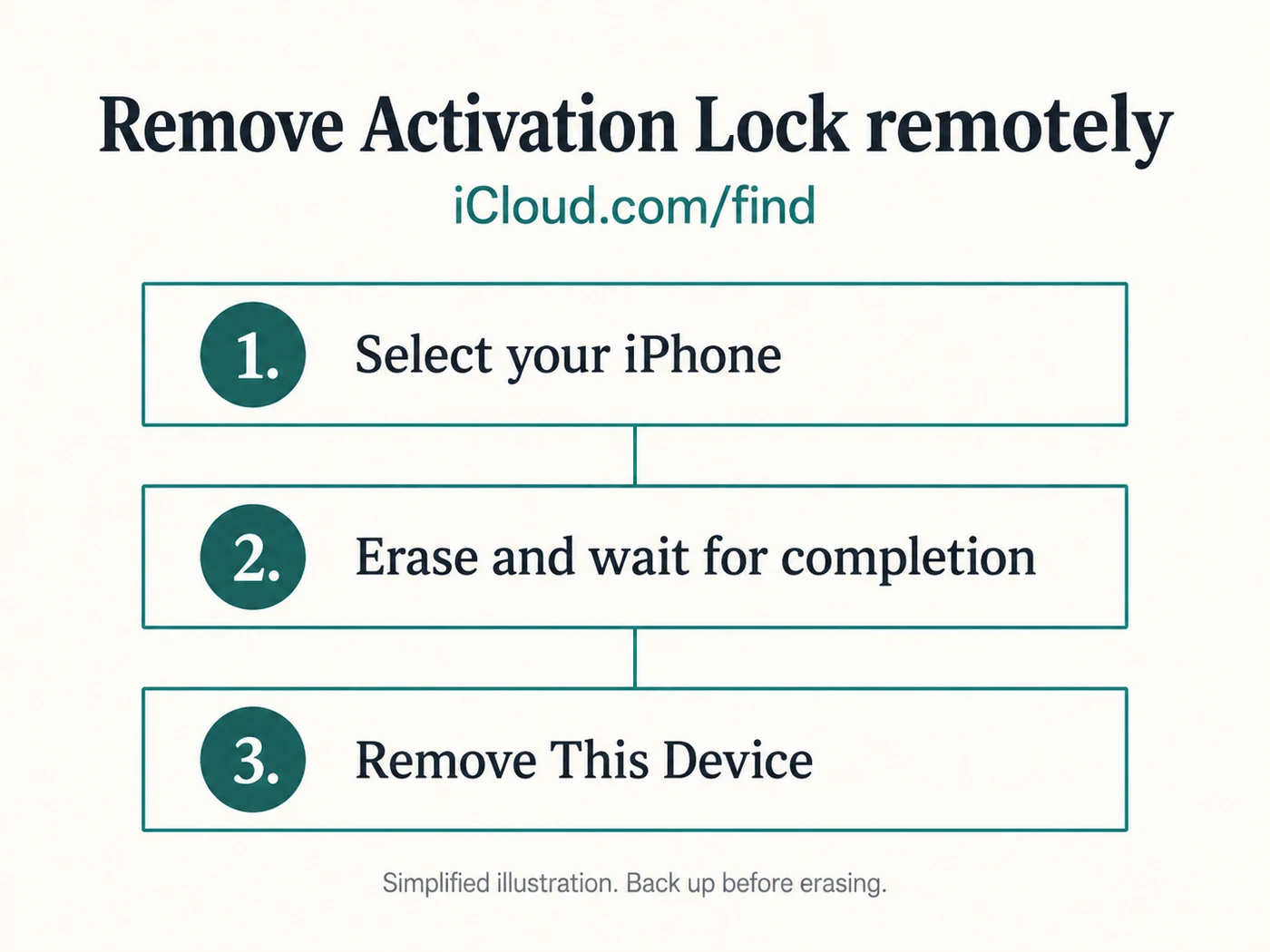
Already erased the phone, or already shipped it? Sign in at iCloud.com/find, select the correct phone, and follow Apple's remote removal instructions: erase the device if needed, wait for the erase to finish, then choose Remove This Device. An offline phone must reconnect before a pending remote erase completes. Do not remove a lost or stolen phone from Find My as part of these sale instructions.
The same lock exists on an Apple Watch, iPad and Mac. Our Apple Watch reset guide walks through the watch version step by step, including the trap that catches most people: erasing a device does not remove the lock.
Android: turn off Factory Reset Protection
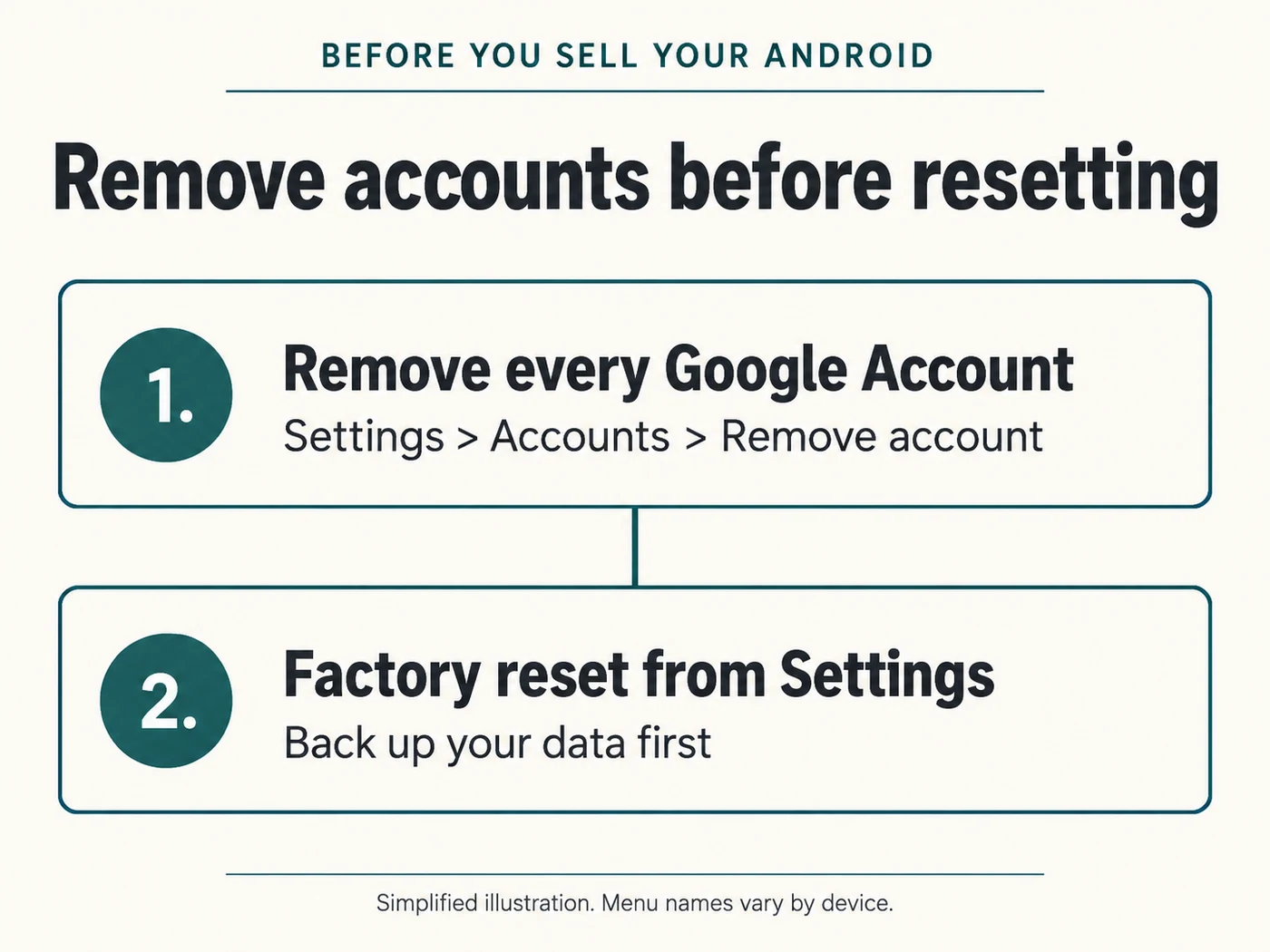
- Open Settings, Passwords and accounts (on some phones, Accounts and backup), select each Google Account and tap Remove account. Remove all Google Accounts from the phone to turn off device protection. If you use a Samsung account, sign out of that too.
- Then factory reset the phone from Settings, System, Reset options (or General management, Reset on a Samsung).
If a secondhand phone is locked to someone else's account, contact the seller for help releasing it. For an iPhone, Apple also offers an Activation Lock support request when you have qualifying proof of purchase. Removing an Android phone from an online account's device list is not a substitute for removing the Google Account in the phone's Settings.
Blacklisted phones
A blacklisted phone has an IMEI reported as lost or stolen, or otherwise blocked by a carrier. Participating networks can refuse service. Techtree does not accept blacklisted devices; a working Wi-Fi connection does not establish that a phone is eligible for sale.
Check yours with the free Stolen Phone Checker (dial *#06# to see the IMEI). If your own phone shows up as blacklisted, for example because it was reported lost and later found, or because of an old unpaid balance, only the carrier that reported it can remove the listing. Call them with proof of purchase and ask them to clear it.
Work phones and MDM
A phone issued by an employer or school is often enrolled in device management (MDM). On an iPhone you can see it under Settings, General, VPN & Device Management. Even after an erase, a managed phone can re-enroll itself during setup, so it has to be released by the organization. Ask their IT team to remove it from management before you sell it, and only sell a work phone that is yours to sell.
Forgot your passcode?
A forgotten screen passcode does not stop a sale. It just means you erase the phone differently:
- iPhone: on iOS 17 or later, enter a wrong passcode until Forgot Passcode? appears, then follow Apple's steps to erase the phone using your Apple Account password. On older versions, or without that option, use a computer and recovery mode. Both are linked in the sources.
- Android: erase it remotely from Google's Find Hub at android.com/find. When the phone restarts it asks for your Google Account password to prove it is yours; sign in, then remove the account as described above.
Either way, once the phone is erased, clear the account lock as described above. After that it is an ordinary sale.
How to sell a carrier-locked phone
- Find your phone on our phone buyback page, choose the storage, and choose the carrier it is locked to. If it says "No SIM restrictions", choose Unlocked.
- Pick the condition. The price appears right away and is locked for 21 days. Accept it and we email you a free prepaid shipping label.
- Ship it with Find My (or your Google Account) removed.
When it arrives we check the IMEI for carrier status, Activation Lock and blacklisting, and inspect the condition using the standards on our grading page. If anything differs from what you chose, you get a revised offer and can accept it or ask for the phone back; our terms explain the few cases, such as a phone that arrives still locked to an account, where return shipping is not free.
Locked to AT&T specifically? Our guide to selling an AT&T-locked phone explains every AT&T unlock error and which ones still let you sell the phone locked. Cracked as well as locked? See what a cracked phone is worth.
If you have not decided between selling and trading in with your carrier, our guide to the best way to sell your phone compares them honestly, and our iPhone 18 breakdown shows what your current iPhone covers toward this year's models.
Frequently asked questions
Can you sell a locked phone? Yes, if it is carrier-locked and paid off. A phone with Activation Lock or Factory Reset Protection on, a balance owed, or a blacklisted IMEI has to be cleared first.
Does a carrier lock stop me selling my own phone? A carrier lock alone does not prevent selling a phone to Techtree. You must own it, have authority to sell it, and meet our requirements for paid-off financing, account removal and a clear IMEI. Your financing contract and the buyer's acceptance policy are separate from the carrier lock.
Is an unlocked phone worth more? In the configurations above, yes. An AT&T, Verizon or T-Mobile lock reduces our offer by $1 to $15 on the iPhone 12 to 14 examples, and $54 to $138 on the iPhone 15 to 17 examples. These are Good-condition, base-storage comparisons checked September 23, 2026, not a guarantee for every model. Either way, you do not need to unlock a phone to sell it to Techtree.
Do I need to unlock my phone before selling it? No. Techtree buys carrier-locked phones as they are. Choose the carrier the phone is locked to in your quote, remove your Apple or Google account, and ship it with the free label.
Can I sell a phone that is not paid off? Techtree requires the balance to be paid off first. Once it is paid off, sell it locked by choosing its carrier in your quote; choose Unlocked only if Settings shows it is unlocked.
Can you sell an iCloud-locked iPhone? Not to Techtree while Activation Lock is enabled. Sign out on the phone, or erase it and remove it through iCloud.com/find. Confirm that Activation Lock is cleared before shipping; account recovery and security delays can add time.
How do I know if my phone is blacklisted? Dial *#06# for the IMEI and check it in the free CTIA Stolen Phone Checker.
My phone is locked to a prepaid brand. Can I sell it? If your model is supported and meets our seller requirements, choose the matching carrier option, or Other carrier when appropriate. Prepaid unlock periods vary by provider. Choose Unlocked only after confirming the phone is actually unlocked.
What happens if I choose the wrong carrier? We check the carrier status when the phone arrives. If it differs, you get a revised offer to accept or decline. Checking Settings first avoids the surprise, and choosing Unlocked for a phone that really is unlocked gets you the higher price from the start.
Sources
- How to unlock your iPhone for use with a different carrier, Apple Support
- What to do before you sell, give away, or trade in your iPhone, Apple Support
- How to remove Activation Lock, Apple Support
- Remove a device from Find Devices on iCloud.com, Apple Support
- If you forgot your iPhone passcode, reset your device without a computer, Apple Support
- Use a computer to reset your iPhone and your passcode, Apple Support
- Help prevent others from using your device without permission, Android Help (Factory Reset Protection)
- Add or remove an account on Android, Android Help
- Find, secure, or erase a lost Android device, Google Account Help (Find Hub)
- Device unlocking policy, Verizon
- Device unlock, AT&T
- SIM unlock policy, T-Mobile
- Stolen Phone Checker, CTIA
Carrier policies and Apple and Google steps verified against the linked pages on September 23, 2026. Prices are Techtree's own, taken from our model pages the same day. Menus move between software versions; if a menu name differs on your phone, the linked support page for your version is the authority.